
What is the ALLMACD indicator?
ALLMACD Indicator is one of the strongest and most updated versions of MACD Indicator.
In the ALLMACD indicator, there is the possibility for you to see MACD in higher timeframes, whilst you are in lower timeframes on the chart.
This feature will allow you to focus more on your trading strategies, since MACD indicator which is in higher time frames lets you to filter the market more accurately.
Take a look at the image below (click to enlarge)
AllMACD Indicator
Add a header to begin generating the table of contents
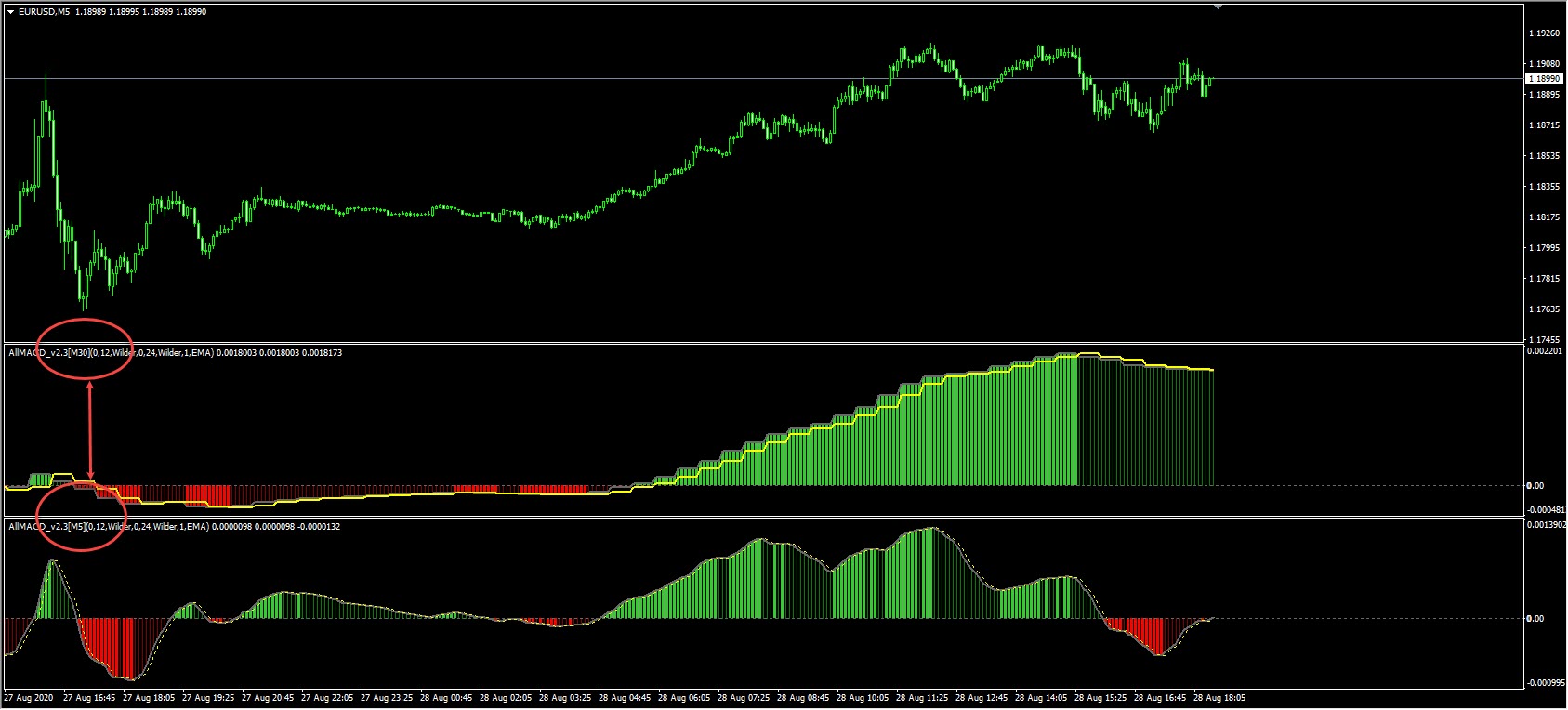
As you can see, we have two MACD indicators on EUR/USD chart in 5 min time frame.
One is in 5 min timeframe and the other MACD indicator is for 15 min time frame.
This feature in the ALLMACD indicator allows you to call it in all different timeframes to have a full view of your chart in respect to the MACD indicator.
How to apply ALLMACD indicator?
The most commonly used feature of MACD indicator, as mentioned in previous posts, is to detect divergence.
In fact, with the MACD indicator, analysts are trying to spot divergences in the market. But imagine that you are in time frame lets say 5 min and you want to also detect divergence at higher time frame at the same time to get more confirmation of the signal received.
In normal conditions you have to constantly check the chart in different timeframes by changing the time frame of the chart. But ALLMACD indicator facilitates this task for you and in one chart you can look at the MACD in any time frame you want with no need to shift the main chart.
Or, for example, imagine that you want to trade only based on MACD indicator. Your strategy is to take the trend based on MACD at higher timeframes and then you trade at a lower time frame based on ALLMACD indicator.
So in order to open different charts, shift your chart in different time frames constantly, then you can easily have them all in one chart with this indicator.
Look at the image below (click to enlarge)
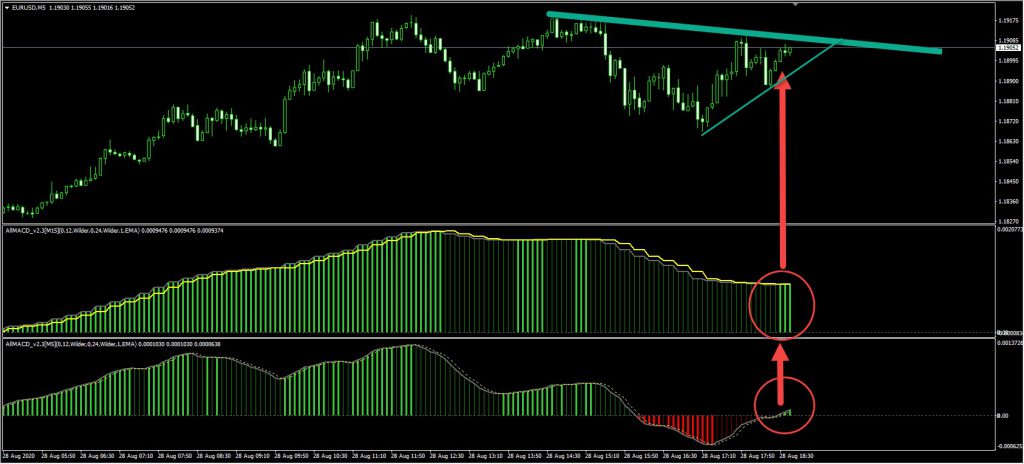
Once again, we are reminding you that only based on one indicator such as the MACD indicator, better not to enter the market.
These are just examples to simplify the use and application of the ALLMACD indicator.
You can certainly achieve great results by combining the indicator with your personal strategy.
You can use the link below to download the indicator:
How to install the indicator in MetaTrader 4? (tutorial)
1- To install the indicator in MetaTrader, first click on File from the top of the MetaTrader tab.
2- Then select the Open Data Folder menu from the menu openned
3- Open the MQL4 folder to install the indicator
4- And then copy and paste in the indicator folder.
5- Now close your meta trader and open it again.
In the relevant menu you will see that the indicator has been added to your list of indicators.
Just double-click on it in MetaTrader so that you can call and place it on the chart.
Hey, that part in the article where it talks about how the ALLMACD indicator helps when you’re on a 5 min timeframe but also want to spot divergence on a higher timeframe for confirmation, without having to switch charts constantly – that really hit home for me.
I’ve been trying to incorporate multi-timeframe analysis into my trading strategy, especially with MACD divergence. I usually trade on the 15-minute chart, but I always try to check the 1-hour or even 4-hour chart to see if there’s any bigger picture divergence happening. It’s a real pain, to be honest.
The biggest challenge is just the time it takes. You open a chart, check the 15-min, then switch to 1-hour, then 4-hour, and by the time you cycle through them, you might miss a good entry on the 15-min. Plus, sometimes I forget which timeframe I was just looking at on which chart, and it gets super messy, especially with multiple pairs.
So, with this ALLMACD, if I have, say, a 15-min MACD and a 1-hour MACD both on my 15-min chart, how exactly would I use them together to confirm a divergence? Like, what specific steps or conditions would you recommend looking for to get that stronger confirmation before I place a trade?
That’s a fantastic point you’ve brought up, and it really gets to the core benefit of the ALLMACD indicator for multi-timeframe analysis. The struggle you described—constantly switching timeframes and potentially missing opportunities—is exactly what this tool is designed to solve. Having multiple MACDs from different timeframes right on your single chart gives you a holistic view without the frantic tab-switching.
When you’re using the ALLMACD to confirm divergence, the general idea is to look for alignment or reinforcement across timeframes. Let’s say you’re primarily trading on the 15-minute chart, and you have an ALLMACD set up to also show you the 1-hour MACD. You spot a potential bullish divergence on your 15-minute MACD—price making a lower low while the 15-minute MACD makes a higher low. This is your initial signal.
For confirmation, you then immediately look at the 1-hour MACD that’s right there on the same chart. What you ideally want to see is either:
1. Matching Divergence: The 1-hour MACD is also showing a bullish divergence, perhaps from a slightly earlier point, or it’s just starting to form one. This is the strongest confirmation because both timeframes agree on the directional shift.
2. Supportive Movement: Even if the 1-hour MACD isn’t showing a clear divergence, you want to see that it’s not contradicting your 15-minute signal. For example, if your 15-minute MACD is showing bullish divergence, the 1-hour MACD should ideally be flat, turning up, or already in an uptrend, rather than sharply pointing down, which would indicate strong bearish momentum on the higher timeframe.
Think of the higher timeframe MACD as a filter or a ‘bigger picture’ context. A divergence on a lower timeframe (like 15-min) gets much more weight if it’s either mirrored by a similar pattern on a higher timeframe (like 1-hour) or at least not contradicted by it. This approach helps reduce false signals from the lower timeframe noise. Remember, as the article mentions, while powerful, it’s always best to combine this with other elements of your trading strategy, like support/resistance levels, trend lines, or candlestick patterns, for the best results. The ALLMACD just makes the multi-timeframe MACD analysis incredibly efficient.
Hi, this looks really useful. Is the ALLMACD indicator compatible with both MT4 and MT5, and where can I find the download link once I’ve learned about it?
Yes, the ALLMACD indicator is designed for compatibility with both MetaTrader 4 and MetaTrader 5 platforms. You will find the download link and detailed installation instructions directly within the ‘Learn and download ALLMACD indicator’ article itself. We focus on providing comprehensive educational content and resources for traders.
Hi, just saw your post about the ALLMACD indicator. Looks interesting! Is it compatible with MT5, or is it only for MT4?
Hello! The ALLMACD indicator we provide is primarily designed for MetaTrader 4 (MT4). While some indicators can be adapted, native MT5 compatibility often requires a separate version. You can find detailed installation instructions and usage guides on the download page to ensure proper setup. Please remember, TejaratFX is an educational and review platform, not a brokerage.