
New_MACD Indicator is One of the strongest Forex indicators
This indicator has been prepared and improved in two versions of MetaTrader 4 and 5 by the programming team of TejaratFX website.
You can now download and use this tutorial and indicator for free.
You can download this indicator for MT4 and MT5 for free in this post.
You can develop your forex strategy by using this indicator or you can follow this indicator as your trading strategy.
However, we believe that there is no single indicator for issuing signal. So always try to use a combination of several indicators to get the signal for improving your strategy and filter out your positions.
New_MACD indicator settings
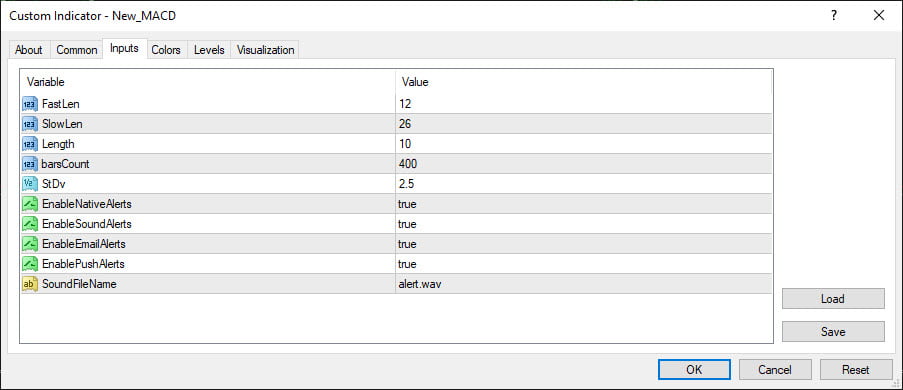
⦁ FastLen (default = 12) – Fast moving average period (period with the smallest period)
⦁ SlowLen (default = 26) – Slow moving average period (when it has the biggest period)
⦁ Length by default = 10 – Moving average period
⦁ BarsCount (Default = 400) – Maximum number of chart bars to do the calculations.
⦁ StDv (default = 2.5) – Weight factor for standard deviation index
⦁ EnableNativeAlerts (Default = False) – If true, MetaTrader pop-up alerts are used to change the color of New_MACD.
⦁ EnableSoundAlerts (Default = False) – If true, Audio alerts are used to change the color of New_MACD.
⦁ EnableEmailAlerts (Default = False) – If true, MetaTrader email alerts are sent with the New_MACD color change.
Please note that Email must be properly configured in MetaTrader via Tools-> Options-> Email.
⦁ EnablePushAlerts (Default = false) – If true, MetaTrader push alerts are sent to your device by changing the New_MACD color. Please note that Notifications must be properly configured in MetaTrader via Tools-> Options-> Notifications.
⦁ SoundFileName (default = “Alert.Wav”) – The name of the audio file. EnableSoundAlerts: to play in alert mode if set correctly.
[adrotate banner=”16″]
You can download New_MACD indicator for MetaTrader 4 below for free:
New_MACD indicator for MetaTrader 5

How to install the indicator in MetaTrader 4?
⦁ To install the indicator in MetaTrader, first click on File from the top of the MetaTrader tab.
⦁ Then select the Open Data Folder menu from the menu opened.
⦁ Open the MQL4 folder to install the indicator
⦁ And then copy and paste in the indicator folder.
⦁ Now close your meta trader and open it again.
In the relevant menu you will see that the indicator has been added to your list of indicators.
Just double-click on it in MetaTrader to call and place it on the chart.
New_MACD Indicator Tutorial
In this section, we will teach you how to work with the New_MACD indicator.
Take a look at the image below (click to zoom)
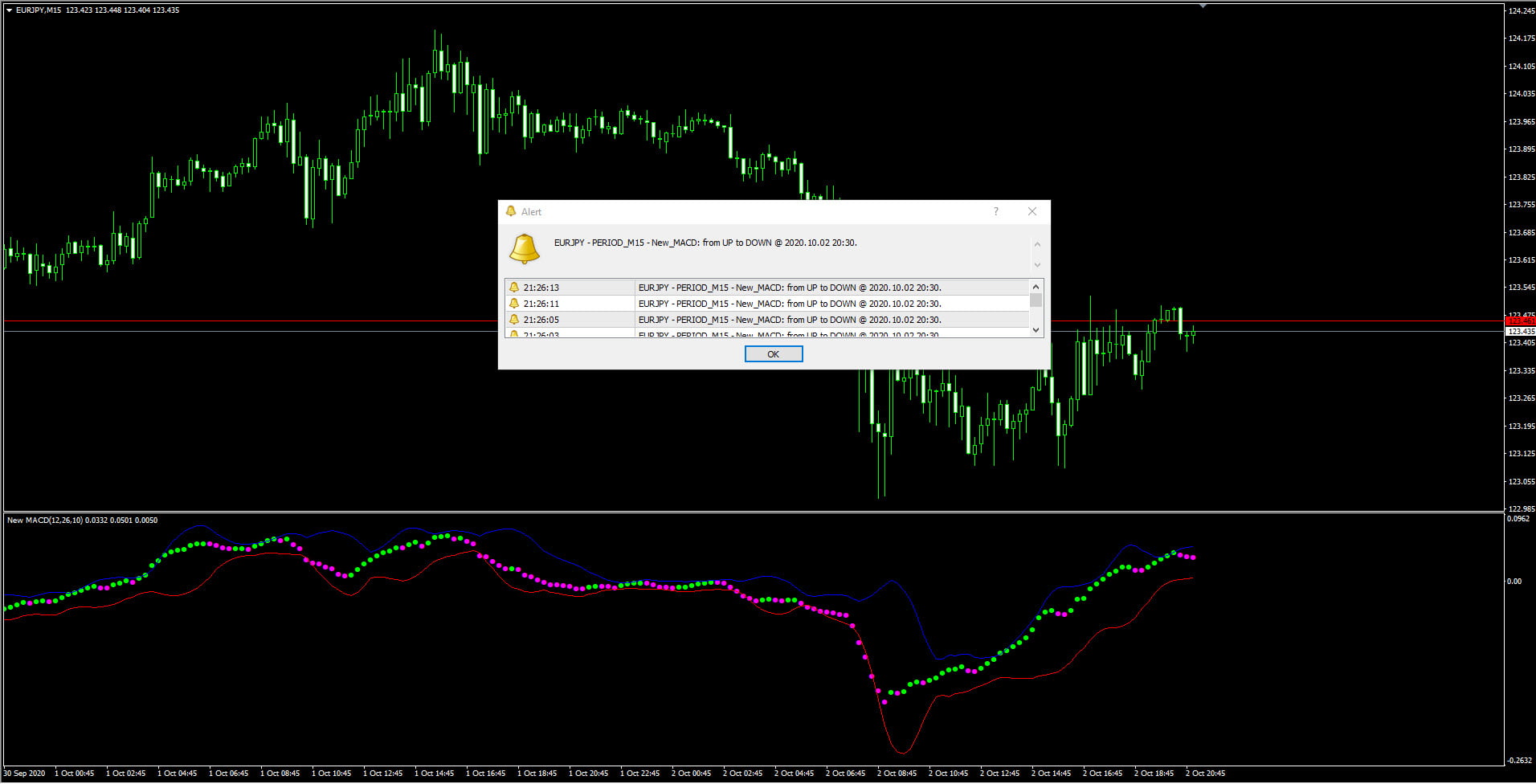
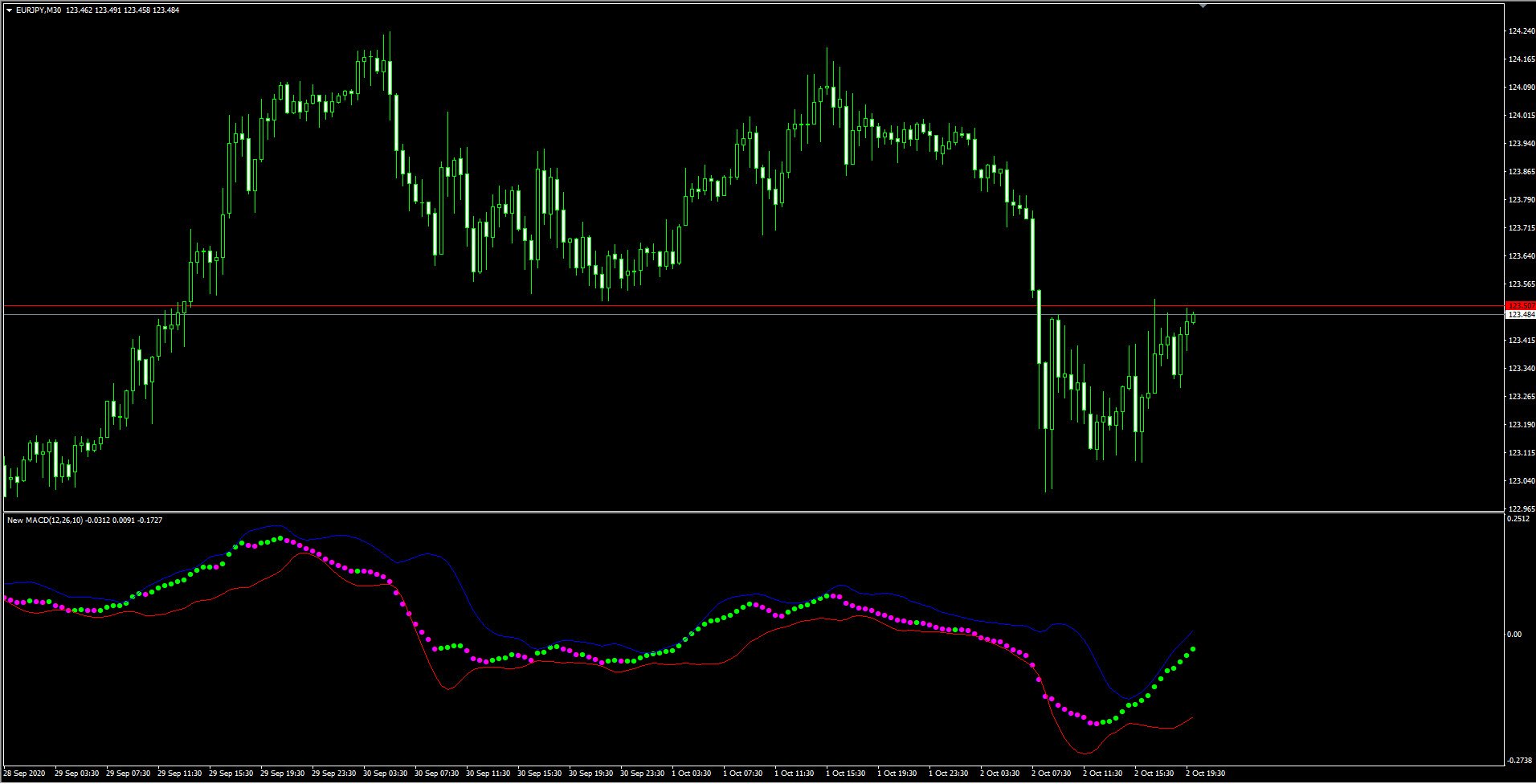
As you can see in the picture, the indicator itself When creating a buy or sell position for you, signals as an alarm, but that alone is not enough.
In fact, this alarm means declaring the current trend of the market from the view point of the New_MACD indicator.
And you can enter the trade based on the signal issued from this indicator together with other methods such as Price Action.
Training of price action is also available in our website.
Of course, you can also use this indicator for short-term positions. You can also trade individually based on this indicator, the risk is high but we tell you how to get acquainted with it as well.
Take a look at the image below (click on the image to enlarge)
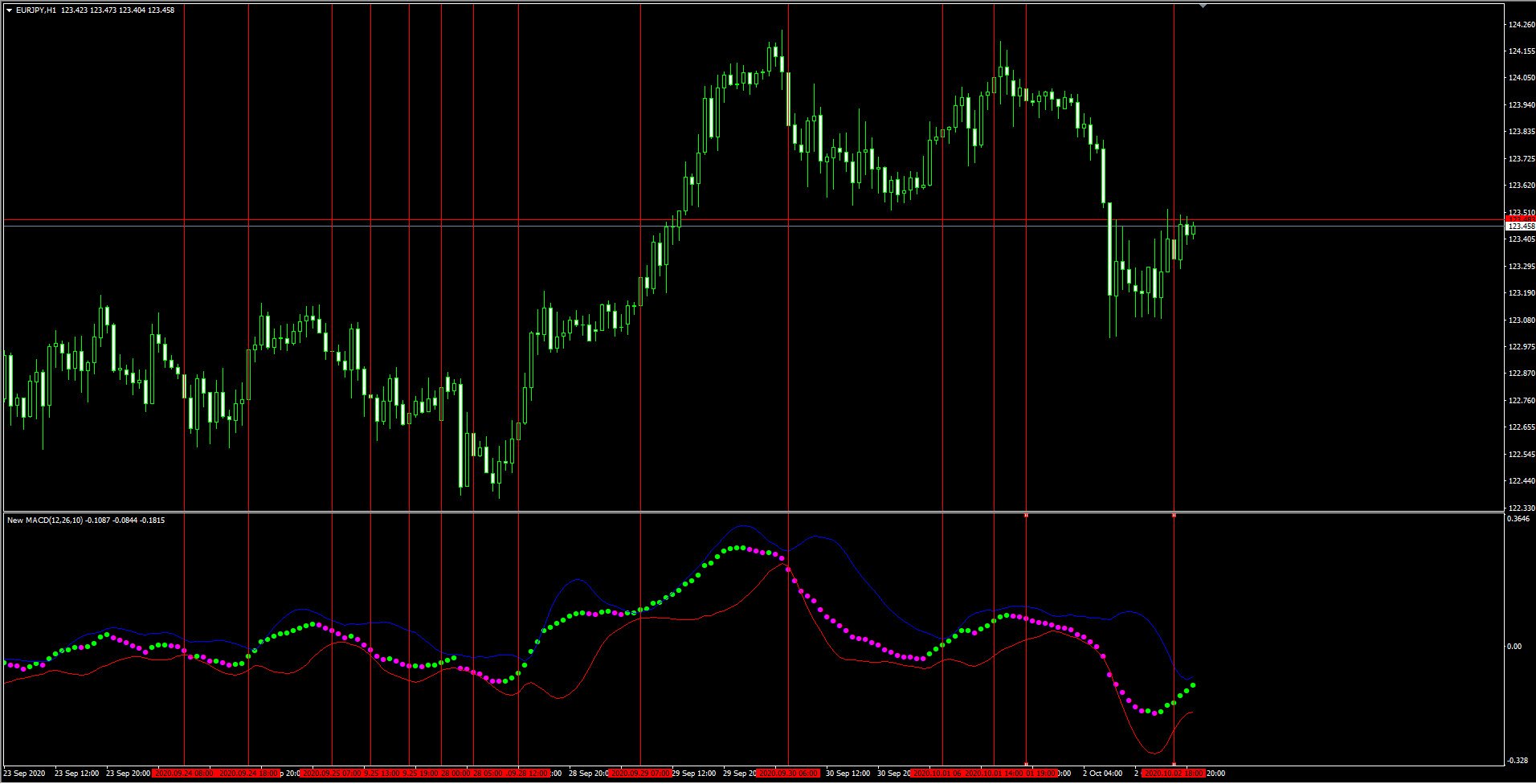
In this indicator, if three markers of single color are created, we can enter the market in its direction.
To exit, you should exit the trade when changing the color of the marker.
Green markers are used for uptrend and purple markers are used for downtrend. You can start to buy or sell based on colors.
Note that this method has a high risk and will also have error signals. It is strongly recommended to use this indicator along with other indicators or strategies for filtering of signals to reduce the percentage of incorrect positions.
We hope you find this post and this indicator useful and effective.
Honestly, when I read about entering a trade just because three markers of the same color show up, and then exiting when the color changes, my immediate thought was ‘yeah, right, in a perfect world maybe!’
I mean, I’ve seen indicators do some crazy stuff in real-time. What looks super clear on a static screenshot can turn into a nightmare of whipsaws and false signals when the market is actually moving. It feels like relying on such a straightforward rule for entry and exit, especially in fast-moving pairs, might just get you stopped out constantly.
Even though you guys mention it’s high risk and can have error signals, it still feels a bit too simplistic for what actually happens on the charts. I’ve tried similar basic color-change strategies before with other indicators, and while they might catch a big move once in a while, the small losses from constant false signals quickly eat away at any gains.
In a live market, price action often moves erratically, creating momentary shifts that could trigger those ‘three markers’ or a color change prematurely. How do you account for market noise or sudden volatility spikes that might give a false entry or premature exit signal based purely on this visual cue?
So, while it’s an interesting idea for getting acquainted with the indicator, I’m really curious if anyone has actually made consistent profits with this exact three-marker-entry and color-change-exit method on its own, without any other confirmation? It just seems like a recipe for frustration in anything but the smoothest trends.
That’s a really valid point, and it touches on something we actually highlighted in the article itself – the inherent high risk of relying solely on this method for trading. We totally get where your skepticism comes from, especially if you’ve been trading live for a while and understand how chaotic the markets can be.
The reason we even introduced the ‘three markers of single color’ approach, despite its risks, is primarily as an initial conceptual understanding of how the New_MACD indicator visually represents trend direction. It’s a very basic, almost raw way to see the indicator’s core function: green for potential uptrend, purple for potential downtrend. For someone just starting or trying to grasp the indicator’s mechanics, it’s a stepping stone.
You hit the nail on the head when you mentioned whipsaws and false signals. That’s precisely why we explicitly stated ‘Note that this method has a high risk and will also have error signals.’ The market is never perfectly smooth. Sudden news events, liquidity gaps, or even just the natural ebb and flow of price discovery can create those brief color changes that would stop you out prematurely or draw you into a fake move. A single indicator, by itself, simply doesn’t have enough ‘context’ to filter out all that noise.
This brings us back to our core philosophy, which we also emphasized: ‘there is no single indicator for issuing signal. So always try to use a combination of several indicators to get the signal for improving your strategy and filter out your positions.’ For example, if you see those three green markers, instead of just entering, you could cross-reference it with Price Action (like a strong support level or a bullish engulfing candle), or maybe another indicator like an RSI showing oversold conditions, or even a higher timeframe trend confirmation. These additional layers act as filters, significantly reducing the probability of error signals.
Regarding your question about consistent profits with this specific standalone method – honestly, it’s highly unlikely. Professional traders rarely rely on such a simple, single-indicator strategy. To make it viable, you’d need robust money management, strict risk control, and perhaps a very specific market condition where it performs marginally better. Our strong recommendation remains to integrate New_MACD with other proven strategies and tools. Think of it as a helpful component in a larger, more sophisticated trading system, rather than a standalone magic bullet. Experiment on a demo account first, combine it, and see how it performs in various market conditions!
Hey, this new MACD indicator looks promising! Is the training mainly written material or are there video tutorials included?
The training for the New_MACD indicator is provided through a comprehensive video series, designed to walk you through its installation, features, and strategic application. Please remember, TejaratFX operates as an independent educational and review platform, and we are not a broker or financial advisor. All resources and information shared are for educational purposes only.